Documentation
The workflow
One loop, five moves. The fourth one is the reason the product exists.
The case-file model
A case in Lexabrief is meant to hold what a case file holds. The agent answers out of what is in it, cites the page it came from, and says so when the record does not carry a point. That is the whole mental model, and everything below follows from it.
- 01
You bring the record
Upload the pleadings, discovery, transcripts, exhibits and orders. Whatever you leave out, Lexa cannot cite, and the citation check will say so if a draft cites it anyway.
- 02
The agent researches and drafts
It searches California and federal authority, reads the documents you uploaded, and writes into a document beside the chat that you can edit at any point.
- 03
Every quotation is checked against its source
Run the check on the draft. Lexa opens each source it cites and reads that source against what the draft says it says. Every quoted passage was found in the source file itself, word for word - nothing was retyped from memory.
- 04
You review what is flagged
The results come back grouped, worst first, with one plain sentence per citation saying what is wrong and what to do. Your decision is recorded against your name and the date.
- 05
You export and you sign
Export to Word in the format profile the paper needs, run the filing checks, and file it under your own signature.
Running the citation check
The control is called Check citations, on the open draft. Lexa opens each source this draft cites and reads it against what the draft says it says. You get one list back: the citations that need your judgment first, then the ones that look right.
Usually 10 minutes or more on a long draft. You can keep working - the list fills in here as it goes. Re-run it after you edit the draft or add documents: a check is a statement about the exact text it read, and edited text is reported as needing another look rather than quietly carrying the old result.
The four groups
Every citation lands in exactly one of four groups, in this order: Never checked, Needs your judgment, You decided, Looks right. The partition is computed once and every surface reads it, so the count in the header and the list underneath it can never disagree.
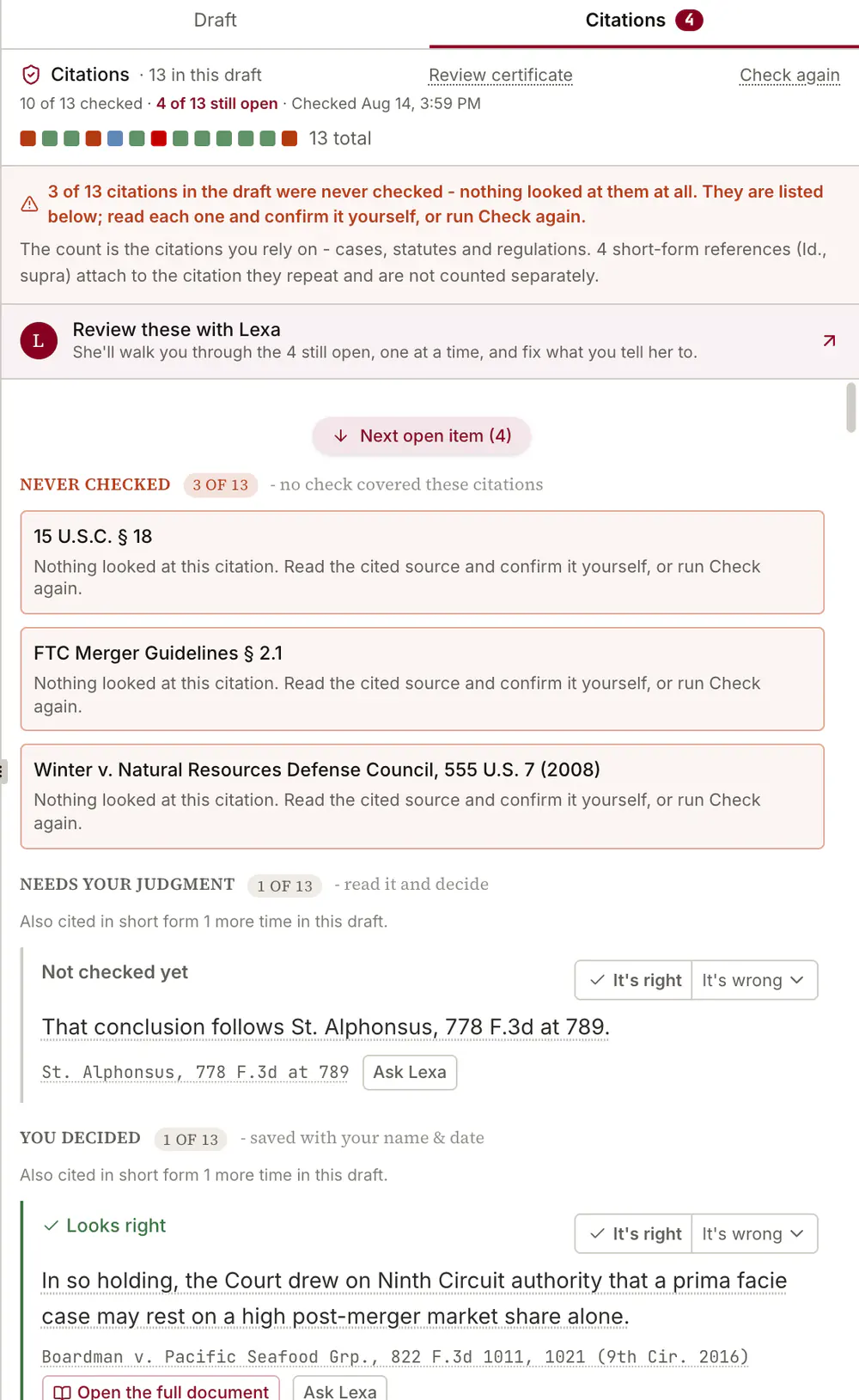
- Never checked
- No check covered these citations, so they carry no verdict of any kind. Read these first.
- Needs your judgment
- Read it and decide. Something about the citation qualifies it: a failed match, a source that could not be opened, a later case that ruled against it, or an edit since the check. This is the working list.
- You decided
- Any citation you confirmed or overrode, saved with your name and the date. Nothing to do, unless the draft changed underneath it, in which case it reopens.
- Looks right
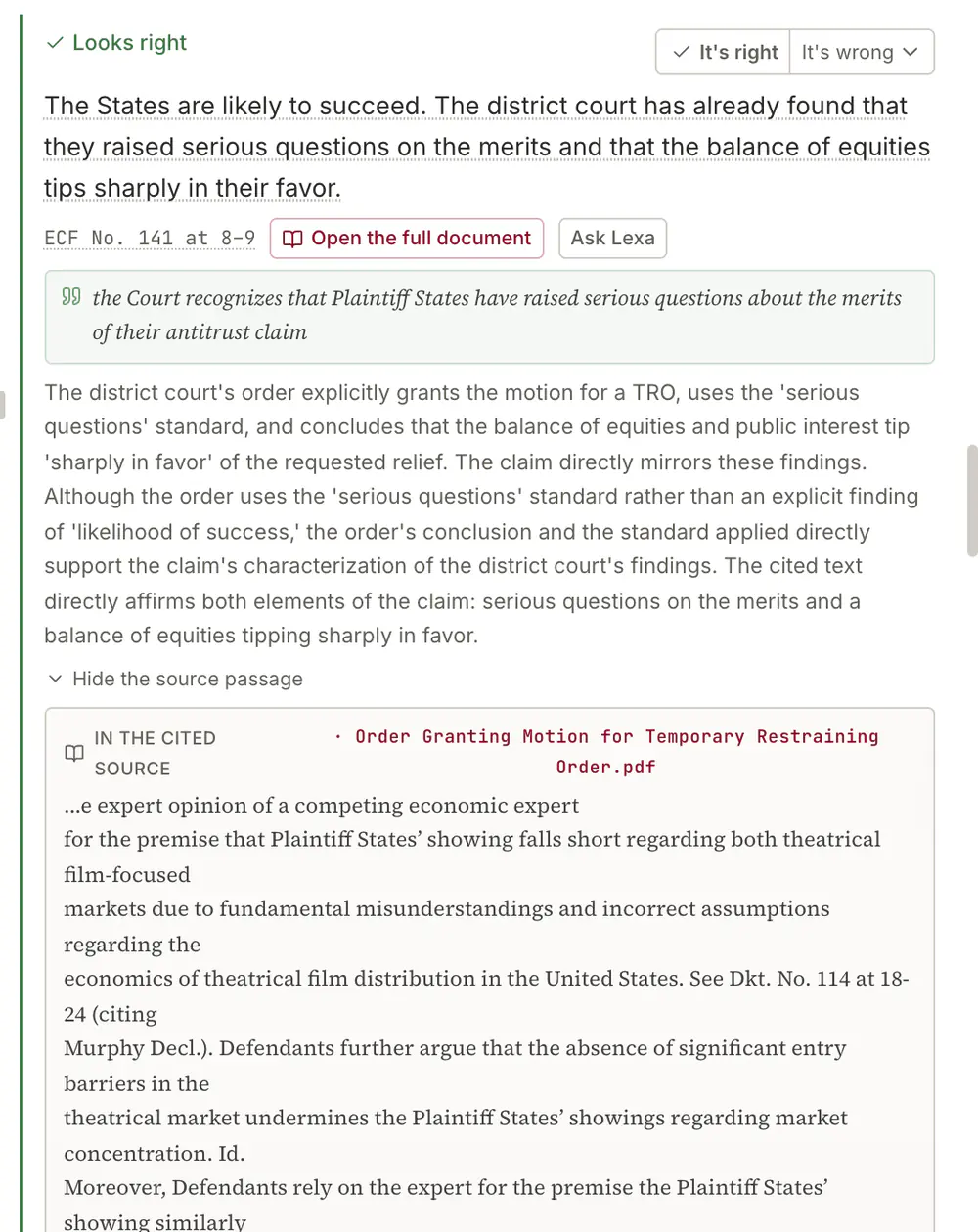
- Nothing to do: a quoted passage here was located in the source file itself, word for word.
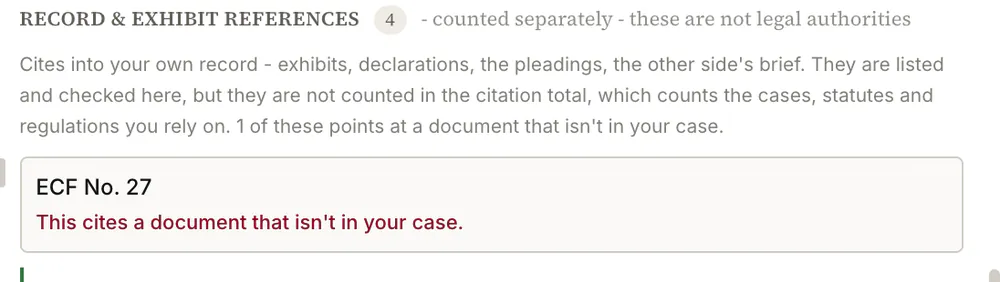
Citations into your own record (exhibits, declarations, the pleadings, the other side's brief) are listed and checked, but they are counted separately from the cases, statutes and regulations you rely on.
What each verdict says
A citation whose source was opened and read carries one of these. They are the words the product uses, not a paraphrase of them.
- Looks right
- The source says what the draft says it says. Nothing to do.
- Doesn't fully match
- Part of the proposition is in the source and part of it is not. Read the passage and narrow the sentence to what the source actually carries.
- Not found in the source
- The cited source was read and does not contain the proposition. Find the authority that does carry it, or cut the sentence.
- The source says the opposite
- The source read the other way. Do not file this one. Read the case yourself before anything else.
- Not checked yet
- No check reached this citation. Re-run the check, or verify it yourself.
What each flag says
Some findings are properties of the citation rather than of the sentence around it, so they outrank the verdict and carry their own line. These are the sentences you will actually see on the card.
- May not be good law, a later case ruled against it
- A later decision criticised, limited or overruled the authority. Read the later case and either replace the cite or distinguish it in the brief.
- Document not found, nothing in the case matches this citation
- The draft cites a document that is not in this case. Upload it, or fix the citation. This one is worth taking seriously: it is the state a citation to something that does not exist lands in.
- We never opened this source, check your own copy
- The text of that authority was never obtained in this matter, from any source, so anything the draft says about it rests on model memory. Pull your own copy and read it before relying on the sentence.
- We couldn't check whether it's still good law, try Check again
- The later-history check could not run for this authority. It is a fault, not a finding. Re-running the check may clear it.
- Not the kind of authority we can check for later history
- Structural, not transient: there is nothing to re-run. Confirm the authority's standing yourself.
- Web page only, open it and confirm it yourself
- The source resolved to a web page rather than to an authority the product can authenticate. Open it.
- This text changed since your review, look again
- You edited the sentence after it was checked, so the earlier result no longer describes the text on screen. The old decision stays visible; it is not silently reused.
- This cites a document that isn't in your case.
- A record citation pointing at a declaration, exhibit or filing that is not in the case. Upload the document, or fix the citation. When the draft also puts words in that document's mouth, the flag says so.
- Details your record doesn't state
- Things the draft says about a party that no document in the case says. Read the passage, then either change the wording or add the document it came from. You may know the fact perfectly well from a conversation that never became a document, which is exactly why this is surfaced rather than corrected for you.
- Short forms that point at nothing
- Could not be matched to an earlier citation. Confirm what it refers to yourself.
Reading the draft itself
In the draft, each checked citation is coloured by its verdict and is a jump target: click it and the review panel scrolls to that citation's card. A located passage carries a "Found in the source, word for word" chip, which means the words were found in the source file itself rather than reproduced from memory.
You can also work the list conversationally instead of clicking through it. "Review these with Lexa" walks the flagged citations one at a time, using the check already run.
Exporting
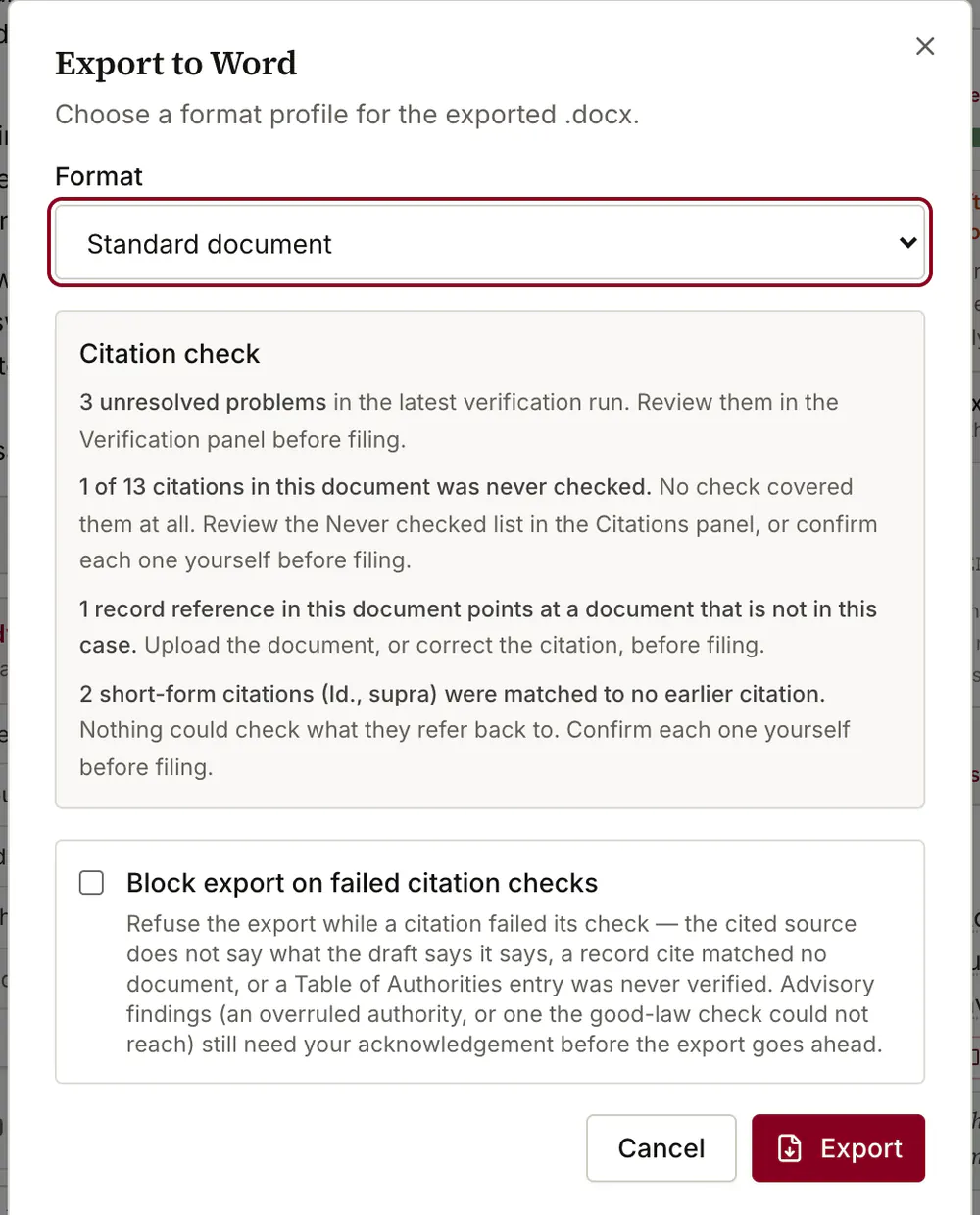
Export the draft to Word (.docx) and choose the format profile the paper needs. The court-filing profile is the one that turns on the caption, line-numbering, footer and table-of-authorities checks; the standard profile leaves them with nothing to measure. Export is the last step, not the finish: Lexabrief produces the file, and you review, sign and file it.